


Audio and video systems are becoming more connected and flexible. Traditional AV installations often rely on dedicated cables between sources, processors, and displays. This approach works well for simple systems, but large installations can become harder to expand and manage.
AV-over-IP offers a different approach. It uses an IP network to transport audio and video signals between devices. This allows AV sources and displays to share a common network infrastructure.
AV-over-IP is now used in corporate offices, education, entertainment venues, control rooms, digital signage, and other commercial environments. It can also play an important role in systems that include large LED video walls.
But how does AV-over-IP work? What are its main benefits and challenges? And what should you consider before building an AV-over-IP system?
This guide explains the basics and provides practical best practices for beginners.
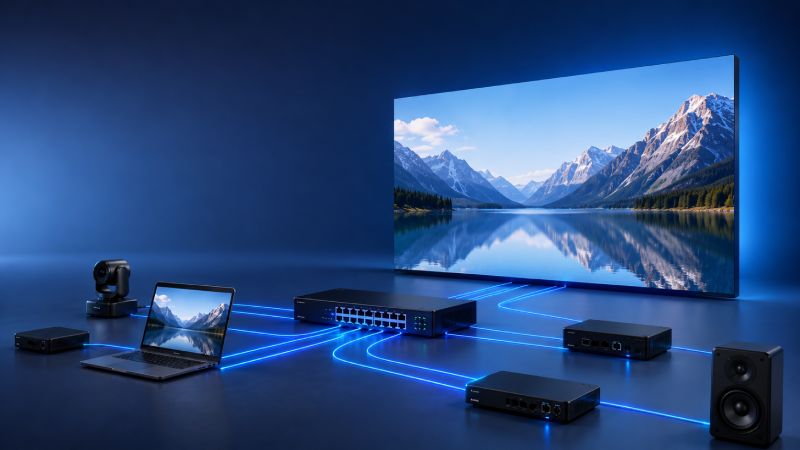
AV-over-IP means transmitting audio and video signals over an IP-based network. Instead of connecting every source directly to a display, an AV-over-IP system uses network infrastructure to distribute signals between different devices.
A typical system includes AV sources, encoders, network switches, decoders, displays, audio equipment, and control systems. An encoder converts an audio or video signal into network data. The data travels through the network, and a decoder converts it back into an AV signal at the destination.
This architecture creates a flexible distribution layer between sources and endpoints. A single source can be routed to multiple destinations, while different sources can be sent to different displays. The exact capabilities depend on the AV-over-IP platform and network design.
The basic process is relatively simple. An AV signal is converted into network data, transported through the IP network, and converted back into a usable AV signal at the destination.
The main steps are described below.
Every AV-over-IP system starts with one or more sources. These may include computers, cameras, media players, video processors, or other AV devices.
The source sends its audio and video output to an encoder. The encoder prepares the signal for transmission across the network.
The encoder converts the AV signal into a network-compatible format. Depending on the system, the signal may be compressed or transmitted with little compression.
This choice affects several factors. These include bandwidth, image quality, and latency. Systems that prioritize low latency and high image quality may require more network capacity.
After encoding, the signal travels through the IP network. Network switches manage the traffic and deliver the stream to the required destinations.
This is one of the main differences between traditional AV distribution and AV-over-IP. The network provides a flexible path between sources and endpoints. It can also support signal distribution across different rooms or areas of a building.
A decoder receives the network stream and converts it back into an AV signal. The output can then be connected to a monitor, projector, audio processor, LED display, or another AV device.
For an LED video wall, the decoded signal may then pass through a video processor or controller. The processor can handle functions such as scaling, switching, and signal management before the content reaches the LED display.
A control platform can manage signal routing and other system functions. For example, an operator may select which source appears on a specific display.
Centralized control becomes increasingly useful as the number of sources and displays grows. It can reduce the need for physical cable changes and make large AV systems easier to operate.
Large LED displays often need to work with several content sources. A typical installation may include cameras, media servers, computers, signage players, and video processors. These sources may need to feed one or more LED screens.
AV-over-IP can provide a flexible distribution layer between these devices. Instead of creating a fixed point-to-point connection for every signal path, the network can route content to the required destination.
For example, a sports venue may have a main LED screen, ribbon displays, concourse screens, and other digital displays. Different sources may need to reach different screens at different times. An IP-based AV system can make these routing requirements easier to manage.
However, AV-over-IP does not replace the LED display’s own processing system. The network transports the signal, while video processors and display controllers handle other parts of the signal chain. Understanding this distinction is important when designing a complete LED display system.
AV-over-IP has become popular because it can provide greater flexibility than traditional AV distribution. Its advantages become more noticeable as the number of sources and destinations increases.
Traditional AV systems often rely on fixed physical connections. Changing the signal path may require a cable to be moved or a different hardware connection to be used.
AV-over-IP can route signals through the network instead. A control system can change the destination without physically reconnecting the AV cables. This is useful when many sources and displays are involved.
Scalability is another important advantage. A system can start with a relatively small number of endpoints and expand as requirements change.
Additional encoders and decoders can be added when more sources or displays are required. The network must have enough bandwidth and suitable infrastructure, but the basic architecture can remain flexible.
This can be valuable for corporate campuses, universities, retail spaces, hotels, sports venues, and large LED video wall installations.
AV-over-IP can simplify system management by providing centralized control. Operators can monitor devices, change signal routes, and manage different endpoints from a central interface.
This becomes particularly useful in large installations. A control room may need to manage dozens or hundreds of endpoints across different areas. Centralized management can reduce the time needed for routine operations and troubleshooting.
Long-distance AV distribution can be difficult when every connection requires a dedicated cable path. IP networks provide another way to distribute signals across a facility.
Ethernet and fiber infrastructure can support long-distance network connections. The actual transmission distance depends on the network design, cable type, switches, and other equipment.
AV-over-IP can reduce the need for separate point-to-point AV connections. Standard network infrastructure can carry AV traffic along with other network services when the system is designed for that purpose.
This does not mean that dedicated AV cabling disappears. The system still needs suitable network cables, switches, endpoints, and physical connections. However, using a common network architecture can make large installations easier to organize.
IP-based AV systems can integrate with other networked technologies. These may include video conferencing, digital signage, room control, building management systems, and LED video walls.
This can create a more connected AV environment. However, integration should be planned carefully. AV traffic and other network traffic may need to be separated or prioritized.
The benefits of AV-over-IP come with additional technical requirements. The network becomes a critical part of the AV system, so poor network design can affect the entire installation.
Bandwidth is one of the biggest considerations. High-resolution video can generate a large amount of network traffic, especially when multiple streams are transmitted at the same time.
A 4K signal generally requires more bandwidth than a Full HD signal. Higher frame rates can increase the requirement further. Compression can reduce network traffic, but it may also affect image quality or latency.
For this reason, bandwidth should be calculated before selecting network switches and other infrastructure.
Latency refers to the delay between the source and the final output. It is an important factor in live and interactive applications.
For example, a presenter may speak while appearing on an LED video wall. If the video is delayed noticeably, the result can feel unnatural. Low latency is also important for live sports, live events, and interactive systems.
Latency can be introduced by several parts of the signal chain. The encoder, network, decoder, video processor, and display can all contribute to the total delay.
Many AV-over-IP systems use multicast transmission. Multicast allows one source stream to reach multiple receivers without sending a separate copy to every receiver.
This can improve network efficiency, but multicast must be configured correctly. Features such as IGMP snooping and IGMP querier functions may be required, depending on the network architecture.
Poor multicast configuration can create unnecessary traffic. In some cases, this traffic may affect other devices and applications on the network.
An AV-over-IP system is connected to a network, so security should be considered from the beginning.
Basic security practices include using strong credentials, keeping firmware updated, restricting network access, and disabling unused services. AV traffic can also be separated from other network traffic when appropriate.
AV teams should work with IT teams to define access rules and network security policies. This is particularly important when the AV system is connected to a corporate network.
Not every AV-over-IP product uses the same technology. Different manufacturers may use different codecs, protocols, control systems, or management platforms.
This can create compatibility issues when equipment from different vendors is combined. Before purchasing equipment, check the supported standards and interoperability requirements.
Open standards can be valuable for projects that need equipment from multiple manufacturers.
AV-over-IP is not automatically the best choice for every project. Traditional AV distribution can still be practical for small systems with simple signal paths.
The difference becomes more significant when a project requires many sources, many displays, flexible routing, or future expansion.
| Feature | Traditional AV | AV-over-IP |
| Connection method | Dedicated AV cables | IP network |
| Scalability | More limited | Highly scalable |
| Signal routing | Usually hardware-based | Network-based |
| Long-distance distribution | Dedicated solutions may be needed | Uses network infrastructure |
| Centralized management | Depends on the system | Common |
| Network dependency | Low | High |
| Initial system design | Often simpler | Requires network planning |
For a small meeting room, a direct AV connection may be simpler and more cost-effective. For a large facility with many sources and displays, AV-over-IP can provide greater flexibility.
The right choice depends on the project requirements, existing infrastructure, performance targets, and future plans.
A successful AV-over-IP installation starts with good planning. The following practices can help reduce technical problems and simplify future expansion.
Start with the actual use case rather than the equipment. Determine how many sources and displays are required. Then define the required resolution, frame rate, audio format, latency, cable distances, and control functions.
Future expansion should also be considered. A system designed only for today’s requirements may become difficult to expand later.
Estimate the bandwidth required by each AV stream. Then consider how many streams may share each network link.
Do not design the network around average traffic alone. Leave enough capacity for peak traffic and future expansion.
Network switches are central to an AV-over-IP system. Port count is important, but it is not the only factor.
Depending on the platform, switches may need to support features such as:
The exact requirements depend on the AV-over-IP platform and system architecture.
AV traffic may compete with other network applications. A dedicated AV network is one option for managing this issue.
Another approach is to use VLANs to separate AV traffic logically. QoS can also help prioritize certain types of traffic.
The best solution depends on the installation. AV and IT teams should agree on the network architecture before deployment.
System failures can interrupt important AV applications. Critical installations may therefore require some level of redundancy.
Depending on the project, this may include redundant network links, backup power, spare devices, or backup signal paths.
The appropriate level of redundancy depends on how critical the AV system is to the operation.
Testing should happen before the final installation. The system should be checked under realistic operating conditions.
Important tests include:
Testing can identify problems before the system goes live.
Good documentation is essential for large AV installations. Record device locations, IP addresses, network ports, signal routes, VLAN settings, switch configurations, firmware versions, and control settings.
Clear documentation makes troubleshooting easier. It also helps technicians understand the system when equipment needs to be replaced or the installation needs to expand.
AV-over-IP can support a wide range of professional applications.
Companies can use AV-over-IP to distribute presentations, video conferencing content, digital signage, and other media across offices.
A centralized system can also simplify the management of meeting rooms and shared displays.
Schools and universities can distribute lectures, presentations, and other content across classrooms.
Large campuses can benefit from centralized AV management. Different buildings can also be connected through suitable network infrastructure.
Sports venues often have many video sources and displays. These may include main LED screens, ribbon displays, concourse screens, control room monitors, and VIP-area displays.
AV-over-IP can provide flexible signal distribution across these different areas.
Retail stores, hotels, transportation facilities, and commercial spaces can use IP-based AV systems to distribute content across multiple displays.
Centralized management can make it easier to control content across many locations.
Control rooms require flexible video routing. Operators may need to view different sources on multiple displays and change these layouts quickly.
AV-over-IP can provide a scalable distribution architecture for these environments.
LED video walls are an important application to consider when designing a modern AV system.
A large LED display may receive content from cameras, media servers, computers, signage players, or other video sources. In a complex venue, several LED displays may need to share the same sources.
An AV-over-IP network can distribute these signals to the required locations. The signal can then pass through the appropriate video processor or display controller before reaching the LED screen.
This approach can be particularly useful in venues with multiple LED displays. A sports facility, for example, may have a main screen, ribbon displays, concourse screens, and other digital displays. Each screen may require different content at different times.
However, it is important to understand where AV-over-IP fits within the complete signal chain. The network transports the AV signal. The LED display system still requires its own receiving and processing components.
Therefore, AV-over-IP should be viewed as part of the overall AV and display infrastructure. It does not replace the technologies that drive the LED display itself.
There is no single AV-over-IP solution that fits every project. The right choice depends on the required performance, network infrastructure, system size, and future plans.
Before selecting equipment, consider the following areas:
Performance: Check resolution, frame rate, image quality, and latency.
Network requirements: Understand bandwidth, multicast, switch features, and network architecture.
Scalability: Consider both the current number of sources and endpoints and possible future expansion.
Compatibility: Check compatibility between encoders, decoders, switches, control systems, processors, and displays.
Management: Consider how the system will be configured, monitored, and maintained after deployment.
A solution that meets today’s requirements may not be suitable if the system is expected to grow significantly. Future requirements should therefore be part of the selection process.
AV-over-IP provides a flexible way to distribute audio and video across modern facilities. By using an IP network as the distribution layer, it can simplify signal routing and make large systems easier to scale.
The technology is particularly useful when a project includes many sources, many displays, or complex routing requirements. It can also work well with applications such as digital signage, control rooms, and LED video walls.
However, AV-over-IP requires careful network planning. Bandwidth, latency, multicast traffic, security, compatibility, and switch configuration can all affect system performance.
The best approach is to start with the application requirements and then design the AV and network architecture around them. With proper planning, an AV-over-IP system can provide a scalable foundation for modern AV distribution.

